

AI-Powered Real-Time Transcription Software for Courts and Legal Proceedings
Automatic Speech Recognition (ASR) for Digital Court Reporting
SoniClear RealTime 10 is real-time legal transcription software for court proceedings, depositions, and hearings. It delivers instant transcription using AI-powered automatic speech recognition (ASR). Spoken words become clear, readable text on screen. Wording and speaker attribution can be corrected while the session is still running.
RealTime 10 works as a standalone product, and is also included with SoniClear Court Recorder 10, adding live speech-to-text to digital court reporting. Together they deliver court recording software with transcription for courts, depositions, and hearings.

For Judges:
See every spoken word and confirm testimony as it occurs. One click controls transcription from the bench in real time.

For Digital Court Reporters:
Stay calm and focused on the courtroom while capturing every detail with confidence. Correct names and speaker IDs as you go, and perform readbacks quickly and accurately.

For Court Clerks:
Ensure the integrity of the record. Real-time transcription gives Court Clerks and Hearing Officers a visual verification of the recording as it happens.

For Steno & Voice Reporters:
Never miss a word, even if your CAT machine writing system falls behind. RealTime 10 keeps the full transcript on-screen at all times.
Key Features
Live Transcription Streaming transcription puts every word on screen the instant it's spoken, and captures it to disk automatically.
Courtroom-Grade Accuracy Transcription accuracy is comparable to real-time feeds from traditional Steno Court Reporters, with improved speaker attribution.
Automatic Speaker Attribution Based on the order of appearance, so each voice is clearly identified from the start.
Easy Readbacks The Edit view organizes text into clean paragraphs by speaker turn, and full-text search finds any word or phrase instantly.
Note Taking Take notes in freeform or using pre-defined Markers to capture speaker identification, spellings, exhibit markings and other important details.
Live Editing Fix spelling and speaker attribution while transcription continues. No waiting until the session ends to start making corrections.
Three Working Views Switch between Live, Edit, and Final Draft views of the same session: live feed, working transcript, and legal transcript format.
Flexible Export Export Live, Edit, or Final Draft views as text files, including a rough ASCII draft with line and page numbers, or a clean version for word processing.
Multi-Lingual Support Transcribes in ten languages, including English, Spanish, and French.
SoniClear Integration Works with Court Recorder 10 digital court reporting software. Combines the real-time transcript with reporter Notes, synchronized with the audio.
How does SoniClear RealTime 10 work?
SoniClear RealTime 10 uses AI-powered automatic speech recognition (ASR) to deliver an accurate transcript to the screen in real time, with tools to refine it during the session.
Is RealTime 10 a good fit for courts and legal proceedings?
Yes, RealTime 10 is built for legal work. It provides speech to text for courts, depositions, and hearings, with live speaker correction and readbacks designed around how court reporters actually work. Because RealTime 10 can integrate with Court Recorder 10, the ASR transcription can be synchronized with the audio and reporter notes for a complete, verifiable record.
How accurate is the automatic speech recognition?
Accuracy is comparable to real-time feeds from traditional steno court reporters, with improved speaker attribution. Because you can correct text and speaker IDs live during the session, the working transcript stays clean without waiting for the proceeding to end.
How does the real-time transcription work?
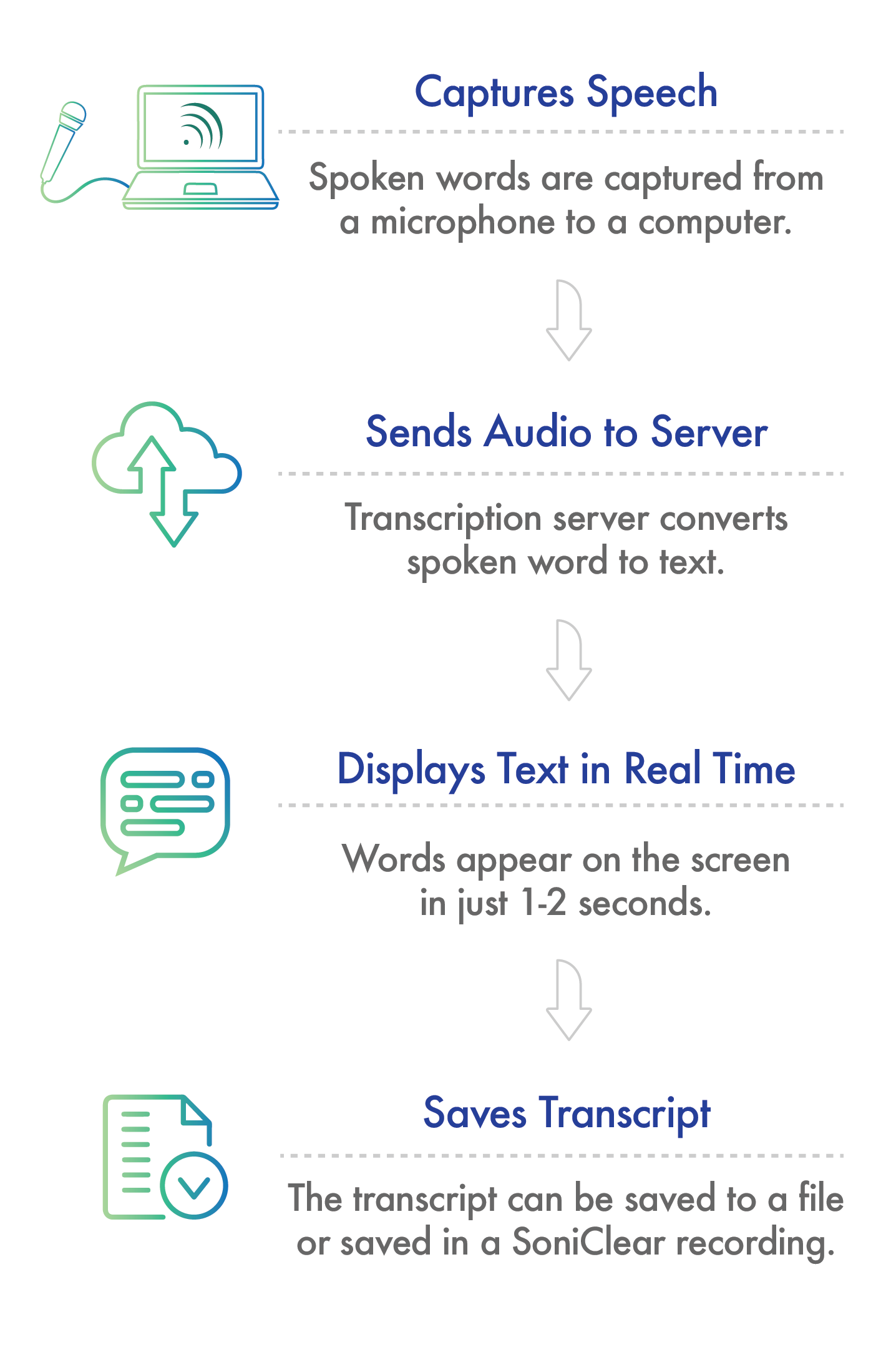
RealTime 10 sends audio to the Cloud Transcription Server over any internet connection, where automatic speech recognition (ASR) converts it to text. The text returns to your computer and displays on screen in 1–2 seconds. On-site hosted transcription is available for high-volume or high-security projects.
What operating system does RealTime 10 run on?
Windows 11. It runs standalone, or alongside Court Recorder 10 or with steno and voice writer systems.
Is the transcript data secure?
All data is encrypted to the highest security standards. When the transcript is complete, the data resides only on your computer. The transcription is returned immediately to your computer and is not stored in the cloud. SoniClear has no access to the transcript, as it is processed on the Transcription Server.
What languages does RealTime 10 support?
The transcription technology handles a wide range of accents and vocabularies, and supports English, Spanish, French, German, Italian, and Portuguese. It also supports multilingual transcription of simultaneous English and Spanish.
What are the three transcript views?
Live View shows raw transcription as it arrives, with timestamps and session notes; it copies to Court Recorder 10, synchronized with the audio.
Edit View is where you correct text and speaker identifications in real time, during the session or after it ends.
Final Draft View shows the transcript in familiar legal format with line and page numbers, ready to export.
How do I save and export transcripts?
Export any of the three views as text files directly from RealTime 10. When integrated with Court Recorder 10, the transcript is automatically saved in the recording along with reporter notes.
How do I get RealTime 10?
Contact a Product Consultant at 626.584.9706 to get started. Cloud-based usage fees are based on transcription session time. SoniClear offers live customer service to ensure reliability and support the work of court professionals.
Get Started with RealTime 10 Today
Call us at 626.584.9706, or the button below to contact us online.