

Professional
Real-Time
Legal Transcription
RealTime 10 Software
SoniClear RealTime 10 software provides live transcription for court proceedings and depositions. The software instantly converts spoken words into clear, readable text on screen, and lets you correct text and speaker attribution while the session is still running.
RealTime 10 is available as a standalone product. It’s also included with SoniClear Court Recorder 10 software, enhancing digital court reporting with integrated real-time transcription.

For Judges:
Judges can see every spoken word to confirm testimony as it occurs. One click controls transcription from the bench in real time.

For Court Reporters:
Stay focused on court room activities while confidently capturing every detail. Correct names and speaker IDs as you go, and perform readbacks quickly and accurately.

For Court Clerks:
Ensure the integrity of the record. The real- time transcription provides a visual verification of the recording process for Court Clerks and Hearings Officers.
Key Features
Three Working Views Switch between Live, Edit, and Final Draft views of the same session: live feed, working transcript, and legal transcript format.
Live Editing Fix spelling and speaker attribution while transcription continues. No waiting until the session ends to start cleaning up.
Easy Readbacks The Edit View organizes text into clean paragraphs by speaker turn, and full-text search finds any word or phrase instantly.
Exceptional Accuracy Transcription accuracy is comparable to real-time feeds from traditional Steno Court Reporters, with improved speaker attribution.
Flexible Export Export Live, Edit, or Final Draft views as text files, including a rough ASCII draft with line and page numbers, or a clean version for word processing.
Supports Digital Reporting Integrated with Court Recorder 10. Combines the real-time transcript with reporter notes and Markers, synchronized with the audio.
Supports Digital Reporting
Integrated with Court Recorder 10. Combines the real-time transcript with reporter notes and Markers, synchronized with the audio.
How does SoniClear RealTime 10 work?
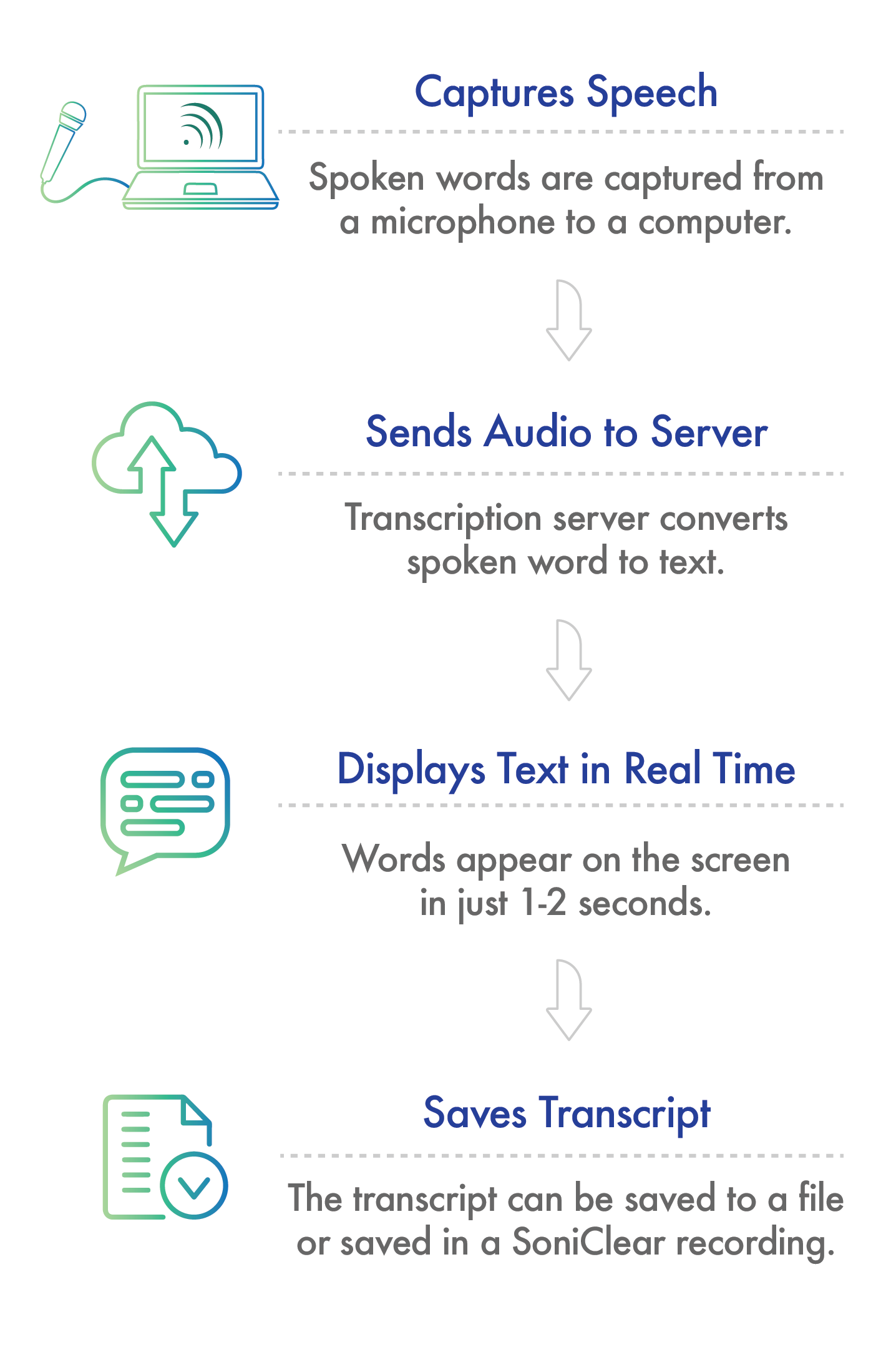
Utilizing the latest in AI transcription technology, SoniClear RealTime 10 delivers an accurate transcript to your screen in real time, with tools to refine your transcript during the session.
SoniClear RealTime 10 software runs on Windows 11. It can be used as a standalone program or together with Court Recorder 10.
Instant Real-Time Transcription
SoniClear RealTime 10 transcribes live spoken words by sending audio to the Cloud Transcription Server through any internet connection. The text is then sent back to your computer and displayed immediately.
All data is encrypted and follows the highest security standards. When the transcript is complete the data only resides on your computer. SoniClear does not have access to the real-time transcript as it is processed on the Transcription Server. On-site hosted transcription is available as an option for large volume transcription projects, or projects requiring high security.
The transcription technology automatically handles a wide variety of accents, and vocabularies, and supports multiple languages such as: English, Spanish, French, German, Italian, and Portuguese. A complete Spanish-language interface is also available for teams working in bilingual environments.
Three Views of Your Transcript
Live View shows the raw transcription as it arrives from the server, with timestamps and any notes added during the session. Live View text is copied to Court Recorder 10, synchronized with the audio.
Edit View is where you correct text and speaker identifications in real time, during the session or after it ends.
Final Draft View shows the transcript in familiar legal format with line and page numbers, ready to export.
Saving Transcripts
SoniClear RealTime 10
View the live transcript on screen and export any of the three views as text files directly from RealTime 10.
Integrated with Court Recorder 10
Add the transcript to any recording along with any notes taken by the court reporter. All entries can be included in the draft transcript that is exported to Microsoft Word.
Installation Options
SoniClear RealTime 10 software license is included free of charge with the purchase of transcription time. Cloud-based usage fees are based on transcription session time. SoniClear offers flexible service options to meet a variety of transcription needs.
Get Started with RealTime 10 Today
Call us at 626.584.9706, or the button below to contact us online.